Modern weather dashboard and terminal companion application built with the latest Next.js App Router architecture. I owned the frontend architecture, data normalization layer, API integrations, and CLI development.
Forecast Storm
TypeScript
React
Next.js
Tailwind CSS
Weather API
Geo API
Astro API
Shell Script
CLI
Terminal UI
Personal Project
Web + Terminal
Full-Stack, CLI
Production
01
Assessment
1.1 / Project Overview
A Weather Platform Built to Evolve
Forecast Storm is a modern weather dashboard and terminal companion application built with the latest Next.js App Router architecture.
Unlike a typical "weather app tutorial project," Forecast Storm evolved through multiple generations over several years — reflecting progression from vanilla JavaScript to React and eventually modern Next.js architecture.
The project began as a learning exercise to understand how complete applications are structured and gradually evolved into a long-term experimental platform for frontend architecture, API integration, and developer tooling.
Long-Term Technical Playground
The project remains actively maintained and continues evolving as a long-term technical playground and portfolio piece — demonstrating architectural maturity over time rather than a single point-in-time implementation.
02
The Problem
2.1 / Initial Motivation
Learning to Build a Real Application
The original goal was straightforward: learn how to build a fully functional web application from scratch.
At the time, a weather dashboard felt large and intimidating because it involved coordinating multiple real-world concerns simultaneously — the kind of integration that separates tutorial code from production software.
01 External APIs
Fetching, transforming, and handling live data from third-party sources.
02 Data Transformation
Converting raw API responses into usable, structured application state.
03 Stateful UI
Managing dynamic weather state and user interactions reactively.
04 Real-World Structure
Organizing a multi-file, multi-concern application from scratch.
2.2 / Project Evolution
Growing With the Project
As skills evolved, the project evolved with them — rebuilt across three generations, each representing a meaningful shift in understanding rather than a replacement of what came before.
- V1Foundational
Vanilla JavaScript
Focused on DOM manipulation, fetching external APIs, and structuring a larger frontend codebase for the first time.
- V2Component-Driven
React
Rebuilt to understand component architecture, state-driven rendering, and declarative UI patterns.
- V3Production-Ready
Next.js 16 + App Router
Modernized to showcase latest React patterns, explore server components, improve architecture, and create a production-quality portfolio project.
At V3, the web app alone no longer felt ambitious enough. This led to the creation of a companion CLI application sharing the same business logic and APIs — extending the project beyond a standard frontend portfolio piece.
03
The Solution
3.1 / Platform Architecture
A Hybrid Web & Terminal Platform
Forecast Storm was rebuilt as a hybrid platform using a server-first architecture with Next.js App Router and typed normalized data structures. The application uses server components for data fetching and shared typed contracts as the bridge between rendering environments.
Web Application
FrameworkNext.js 16 (App Router)
UIReact 19
LanguageTypeScript
StylesTailwindCSS 4
Themingnext-themes
RenderingServer Components
CLI Application
RuntimeBash
Datacurl + jq
RenderingANSI / Unicode TUI
3.2 / Data Strategy
NormalizedWeather— The Shared Contract
The app combines multiple APIs, but instead of tightly coupling rendering to raw vendor responses, all data is normalized into a shared typed contract. The renderer changes — the data model stays consistent.
SourceResponsibility
Visual CrossingCore weather data
WeatherAPIMoon phase & astronomy
ipgeolocation.ioIP-based city detection
Why Next.js App Router
- Server-side fetching: Centralized, collocated with the route
- Streaming-ready: Progressive rendering architecture
- Async rendering: Simplified server component data flow
- Route structure: Clean separation between data and UI layers
Why a CLI Companion
- Shell scripting: Exploring Unix tooling patterns
- Terminal UX: Learning TUI design and TTY behavior
- Developer tooling: Building installable, pipeable developer tools
- Shared logic: Reusing application semantics across environments
The CLI can be installed via curl/wget, Homebrew, or executed directly as a one-shot script — making it both a user-facing product and a developer-oriented tool.
04
Key Features
4.1 / Delivered Functionality
Platform Capabilities
Forecast Storm delivers a cohesive set of features across two distinct rendering environments — the web dashboard and the terminal — unified by a shared data architecture.
001
Modern Weather Dashboard
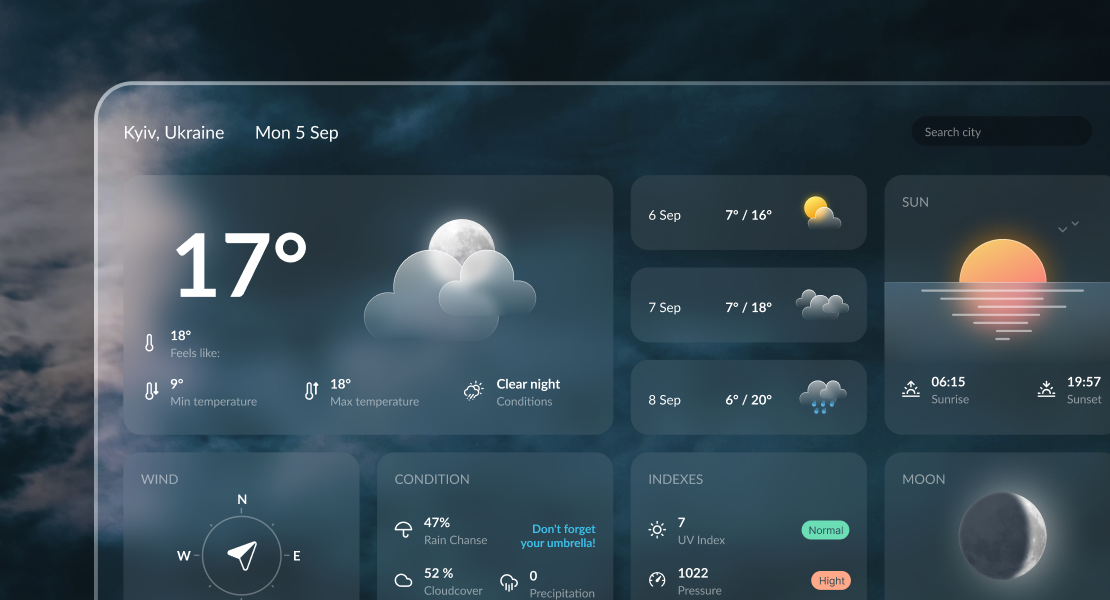
Dynamic weather widgets with responsive layouts, theme switching, and clean card-based UI system.
002
Shared Typed Data Architecture
A centralized NormalizedWeather contract powers both React widgets and terminal rendering.
003
Installable CLI Application
A fully standalone terminal application with TUI rendering, plain-text mode, and JSON output.
004
Runtime Script Injection
API keys are injected at runtime into a served bash script, enabling one-line install flows.
005
Theme System
Multiple themes with dynamic wallpapers and dark/light adaptation.
006
IP-Based Auto Detection
Automatically resolves user location from request IP and loads local weather with no onboarding friction.
007
PWA Readiness
Installable on desktop and mobile through manifest configuration and browser install support.
05
Technical Deep Dive
5.1 / Rendering Architecture
Server-First Rendering
app/page.tsx operates as a server component responsible for the full data pipeline — keeping fetching logic centralized, rendering components lightweight, and type contracts consistent throughout the tree.
- 01
Read query params from the request
- 02
Resolve city from IP when no argument is provided
- 03
Fetch weather + astronomy data in parallel
- 04
Normalize API responses into NormalizedWeather
- 05
Pass typed data into widget components as props
Data Normalization Layer
Raw API responses differ significantly between providers. To avoid coupling widgets to vendor-specific structures, all responses are transformed into NormalizedWeather before reaching the UI. Providers can theoretically be swapped without rewriting any component.
Data Acquisition
- Visual Crossing → core weather
- WeatherAPI → moon & astronomy
- ipgeolocation.io → city from IP
Rendering Logic
- Web widgets → consume NormalizedWeather
- CLI renderer → same typed contract
- Utilities → shared helpers
CLI ↔ Web Shared Architecture
The CLI mirrors the web dashboard architecture — sharing weather semantics, formatting rules, and icon naming conventions. The project effectively treats the web UI and terminal UI as two renderers operating on the same conceptual SDK.
Shared ConceptBoth Environments
Weather semanticsIdentical data meaning across renderers
Formatting rulesSame display logic for temperatures, units, dates
Icon conventionsShared naming for weather condition icons
Cache behaviorConsistent TTL and refresh strategy
5.2 / Dynamic CLI Delivery
Runtime Script Injection
The route /app/cli/route.ts reads the raw bash script and injects environment variables before serving it. This enables secure runtime distribution, one-line install flows, and environment-aware script generation.
CLI_DELIVERY.FLOW
[1]
Read bash script from filesystem
[2]
Inject API keys at request time
[3]
Serve executable to client
[4]
Client downloads, applies permissions, places in PATH
5.3 / Terminal UX Engineering
Context-Aware Shell Behavior
The CLI was designed to behave correctly in multiple shell contexts — requiring TTY detection, ANSI handling, and output mode abstraction to adapt automatically.
ContextBehavior
Interactive shellFull TUI with Unicode box drawing
Pipe / redirectPlain text output
Script usageStructured output
JSON modeRaw machine-readable data
TailwindCSS 4 Architecture
The frontend uses TailwindCSS 4 with a utility-first, composable architecture — intentionally avoiding heavy component abstractions in favor of shared layout primitives and minimal runtime styling overhead.
Utility-first
No runtime CSS-in-JS overhead
Layout primitives
Shared spacing and grid conventions
Minimal abstractions
Composable over encapsulated
06
Outcomes & Impact
6.1 / Technical Platform
Long-Term Growth Platform
Forecast Storm became more than a portfolio project. Each rebuild represented a meaningful shift in technical understanding — not just a replacement, but a deepening of the same conceptual domain.
Architecture Progression
- Foundational
Vanilla JS
DOM manipulation & API integration
- Component-Driven
React
Component systems & state-driven rendering
- Production-Ready
Next.js App Router
Server-first architecture & typed development
6.2 / Architectural Understanding
Frontend Architecture Confidence
The progression across three stacks provided increasingly deeper understanding of state-driven rendering, component systems, server-first architecture, and typed frontend development.
The project became a practical record of technical growth over time — with each version revealing the limitations of the previous approach rather than simply replacing it.
Expanded Beyond Traditional Frontend
Adding the CLI transformed the project into something more unique than a standard weather application. It demonstrates that frontend skills extend meaningfully beyond the browser.
Shell scripting
Writing maintainable, portable Bash
Terminal UX design
Thinking in TTY, pipes, and output modes
Multi-environment architecture
Same logic, different renderers
Shared logic systems
Business rules that transcend the browser
Developer tooling
Installable, pipeable, distribution-aware
6.3 / Product Quality
Visual & UX Quality
With custom professional design direction, the project emphasizes atmosphere, typography, motion, theme consistency, and responsive polish. The result feels closer to a product experience than a tutorial implementation.
AtmosphereWallpaper-driven visual environments per theme
TypographyPurposeful type hierarchy across widget types
MotionSubtle transitions that reinforce the weather context
ResponsivenessMobile-first layouts with desktop optimization
07
Lessons Learned
7.1 / Key Takeaways
What This Project Taught Me
Each generation of Forecast Storm surfaced a new layer of understanding — about architecture, tooling, data design, and what it means to build software that lasts.
- 01
Rebuilding Projects Is Extremely Valuable
Rewriting the same application across multiple stacks revealed architectural weaknesses, better abstraction patterns, and different mental models between frameworks. Each version deepened understanding rather than replacing the previous one.
- 02
Data Contracts Matter
Creating a normalized shared data layer significantly simplified widget rendering, CLI implementation, and maintainability. It reinforced the importance of treating data modeling as a first-class architectural concern — not an implementation detail.
- 03
Frontend Skills Extend Beyond Browsers
Building the CLI introduced shell scripting, terminal rendering, TTY behavior, and Unix tooling patterns. It expanded understanding of software interfaces beyond traditional web development — and raised the ceiling on what a frontend project can demonstrate.
- 04
Modern React Feels Most Powerful When Server-First
The move to App Router clarified the benefits of server components, centralized data fetching, and reduced client complexity. The architecture feels cleaner and more scalable than earlier client-heavy implementations.
- 05
Long-Term Projects Reveal Real Growth
Forecast Storm demonstrates not a single implementation, but an evolving development process across multiple years. The project became a living record of technical progression, architectural maturity, and increasing product awareness — something a one-time tutorial implementation cannot show.